
How to Automate Guest Messages on Airbnb: Step-by-Step Guide
If you manage short-term rentals, you know it: guest messages eat your time like nothing else. The same questions about WiFi and parking, at any hour, in any language. And the worst part? You can't ignore them, because response time directly influences your Airbnb ranking.
This guide shows you 4 automation levels — from free to most advanced — with real data, concrete costs, and ready-to-use templates. By the end, you'll know exactly which approach makes sense for your portfolio.
For context: based on our internal data across 1,500+ bookings, an average booking generates 8–12 messages between host and guest, and 60–70% of them are repetitive questions. All the market numbers cited in this guide are sourced on the Italy short-term rental data page.
Capitolo 01 / 07
April 2026 update
Three operational details have changed since this guide was first published — they matter if you're setting up automations now:
- WhatsApp Business API raised "marketing" conversation pricing in the EU in February 2026 (~+8%). If you send check-in reminders as marketing templates, consider switching to "utility" conversations — pricing there is stable.
- Airbnb extended the algorithm that rewards sub-60-minute response time to newly listed properties, not just established ones. Automation now matters even more for fresh listings.
- Property managers with 5+ units are consolidating their stack: WhatsApp messages via an AI concierge (e.g. Verto), in-app Airbnb automations only as a fallback for guests who don't switch to WhatsApp. Both scenarios are covered below.
Capitolo 02 / 07
Why automating messages isn't optional (the numbers)
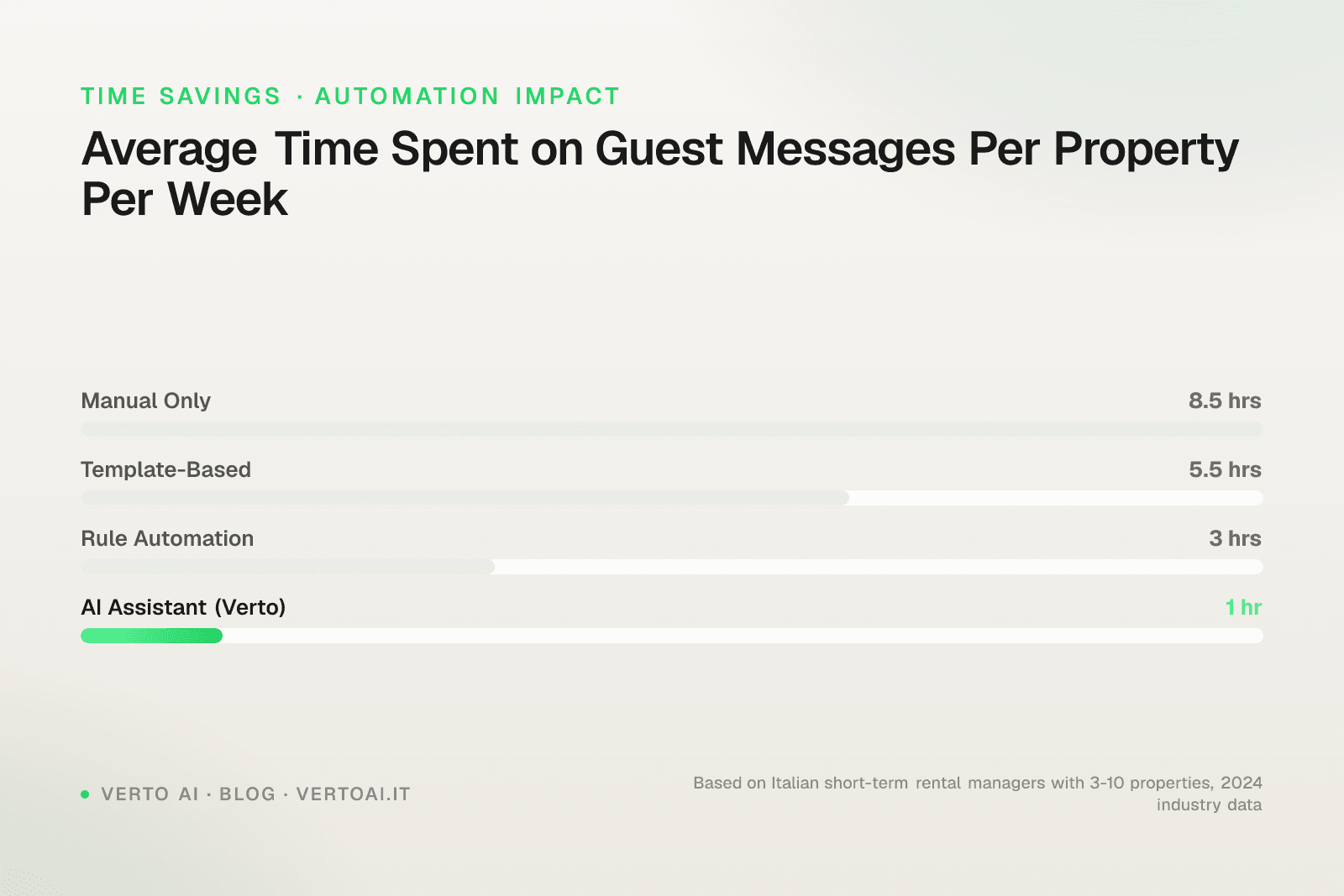
Before diving into the "how," let's look at the "why" — with data, not opinions.
The time you're wasting
| Properties managed | Messages/day | Estimated time/day |
|---|---|---|
| 1-2 | 5-8 | 20-30 min |
| 5 | 15-25 | 60-100 min |
| 10+ | 30-50 | 2-3 hours |
With 10 properties, you spend over 80 minutes daily just answering messages. That's 40+ hours per month — basically a part-time job dedicated solely to saying "the WiFi password is on the router label."
And 22% of these messages arrive between 9 PM and 7 AM. Translation: guests writing you while you sleep and expecting a response.
Dato
Tempo giornaliero per messaggi ospiti
Peak
240
10+ apt
Range
25 – 240
value
The impact on your business
Response time isn't just a matter of convenience. It has a direct and measurable impact on your performance:
-
Airbnb rankinglistings with response time under 1 hour rank significantly higher in search results. Hosts who respond within 1 hour are 3 times more likely to convert an inquiry into a booking compared to those who respond after 6 hours.
-
Superhost statusAirbnb requires responding to 90%+ of messages within 24 hours. Superhosts earn on average 60% more in daily revenue compared to regular hosts. For a property generating €50,000/year, we're talking about +€30,000 potential.
-
Reviewshosts who implemented automated messaging report an increase in guest satisfaction score from 4.6 to 4.9 and a +20% in 5-star reviews. A documented case study shows the "communication" rating rose from 74% to 91% in just 90 days.
-
Bookingsthe same case study reports an +18% booking rate as a direct consequence of improved reviews.
Dato
Prima vs dopo l'automazione
These aren't theoretical numbers. They're data collected from real hosts who switched from manual management to automation.
Capitolo 03 / 07
The 4 automation levels: from basic to AI
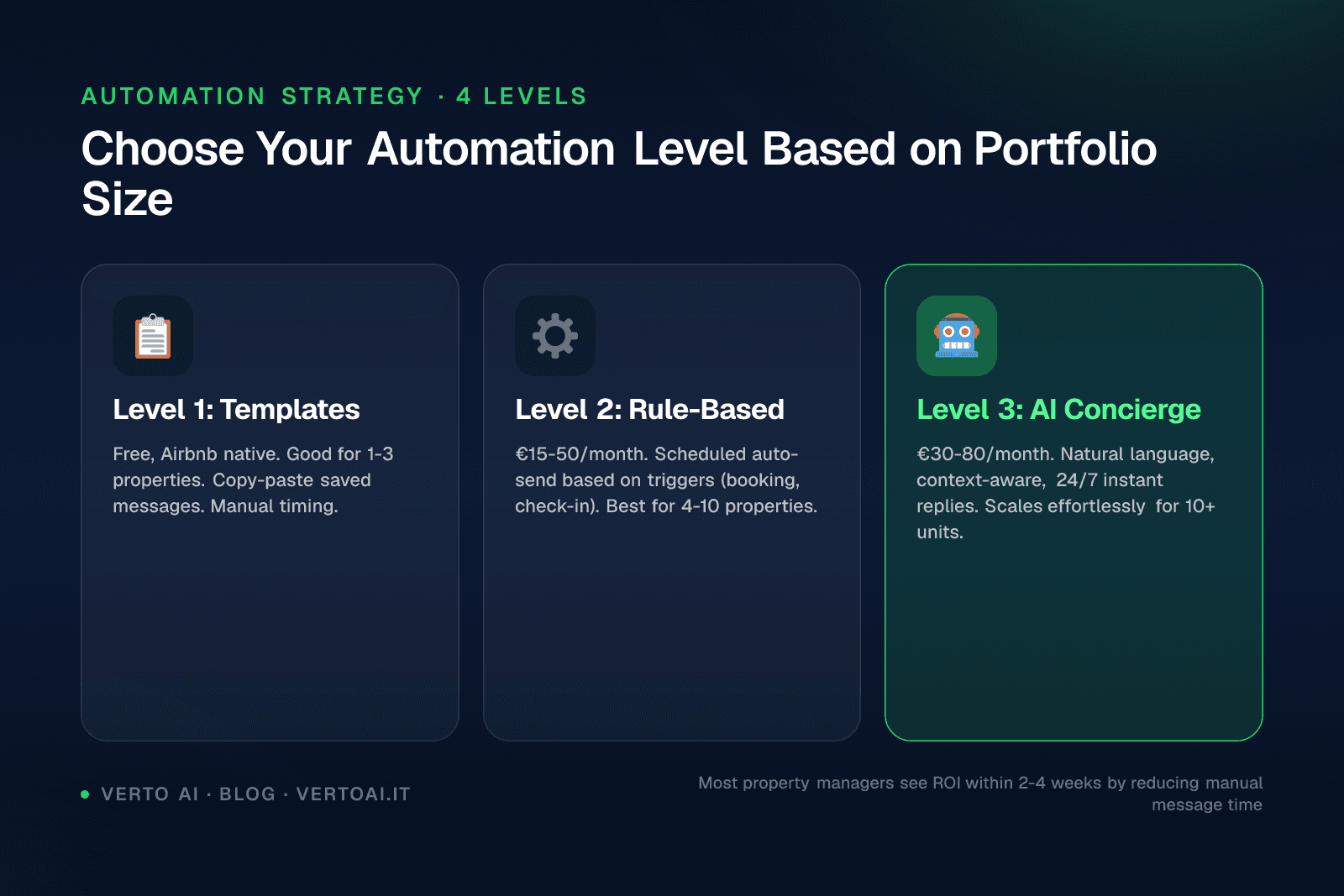
There's no single way to automate. There are 4 progressive levels, each with different advantages and limits. The right choice depends on the number of properties you manage and your objective.
Percorso
I 4 livelli di automazione messaggi
Manuale
€0 (ma il tuo tempo)Leggi e rispondi a tutto tu
Messaggi programmati
GratuitoAirbnb nativo: 3 trigger, template base
Tool rule-based
€30-150/meseHospitable, Nowistay: keyword + regole IF/THEN
AI conversazionale
€100-300/meseAI che comprende, risponde, fa upsell — su WhatsApp
Level 0: Manual management (where you probably are now)
You read every message. You write every response. You copy and paste from a notes file.
Prostotal control, personal tone.
Consdoesn't scale. With 3+ properties it becomes unsustainable. With foreign guests, add translation time. At night, you don't respond.
Real costyour time. If you value it at €25/hour and spend 2 hours/day on messages, that's €1,500/month in opportunity cost. You could spend that time acquiring new properties or improving existing ones.
Level 1: Airbnb scheduled messages (free)
Airbnb offers a native system of scheduled messages and quick replies. It's the starting point.
How to set it up (step-by-step)
- Go to Hosting section → Messages → Scheduled messages
- Create a new scheduled message choosing the trigger:
- New confirmed booking
- Check-in day
- Check-out day
- Write the template using shortcodes for personalization:
{guest_first_name}— guest name{check_in_date}— check-in date{check_out_date}— check-out date{listing_name}— listing name
- Set the timing: how many hours/days before or after the trigger
- Activate for all listings or only selected ones
Ready-to-copy templates
Post-booking message
Hi {guest_first_name}! 🏠
Thank you for booking {listing_name}. I'm happy to have you as a guest from {check_in_date} to {check_out_date}.
A few days before check-in, I'll send you all arrival instructions with door code, WiFi, and directions.
In the meantime, don't hesitate to message me with any questions!
Check-in message (the day before)
Hi {guest_first_name}, we're almost there! 🎉
Here's everything you need for tomorrow's check-in:
📍 Address: [full address + Google Maps link] 🔑 Door code: [code] 📶 WiFi: Network: [name] | Password: [password] 🅿️ Parking: [instructions] 🕐 Check-in: from [time] to [time]
I recommend saving this message
— so you have everything at your fingertips!
Check-out message
Good morning {guest_first_name}! ☀️
I hope your stay was enjoyable. Here's a reminder for today's check-out:
🕐 Check-out by: [time] ✅ Leave keys [where] 🗑️ Take trash to the bin [directions]
If you have a minute, I'd greatly appreciate your review — it helps tremendously! ⭐
Safe travels and see you soon! 🙏
Important Level 1 limitations
- No conditional logic: the same message goes out for both a 1-night stay and a 30-night stay
- Zero multilingual: if the guest is German, they receive the message in English. Period.
- Only scheduled messages, zero responses: if the guest asks "where's the supermarket?", no one responds for you
- Reported bugs: several hosts in the Airbnb community report scheduled messages that don't send
- Co-hosts excluded: co-hosts cannot see or modify templates scheduled by the main host
- Character limit: 4,000 per message
Verdictsufficient for 1-2 properties as a starting point. Inadequate for anyone wanting to scale or with international guests.
Level 2: Rule-based automation tools
The next leap is dedicated tools that operate with IF/THEN rules: if the guest writes "WiFi," respond with message X. If it's 2 days before check-in, send message Y.
Main tools on the market
| Tool | Price | Key features | Ideal for |
|---|---|---|---|
| Hospitable (ex Smartbnb) | From $40/month (2 prop) + $15/prop | Keyword recognition, 9 triggers, handles ~90% routine messages | PM with 5-15 properties |
| Guesty (ReplyAI) | Enterprise pricing (contact) | Sentiment analysis, multilingual responses, autopilot | PM with 50+ properties |
| Hostrexa | From $29/month (5 prop) | AI messaging + task management | Small-medium PM |
| Nowistay | From €9/month per property | AI co-host 24/7, 90+ languages, digital welcome book | Individual-medium hosts |
How Hospitable works (the most widespread)
Hospitable analyzes incoming messages looking for keywords (WiFi, parking, check-in, late arrival...) and responds with pre-configured templates. It has processed over 108 million messages since its founding in 2016.
The workflow:
- Connect your Airbnb and Booking.com accounts
- Configure templates for each property
- Define triggers (keywords + booking events)
- The tool responds automatically when it recognizes the pattern
The structural limitationif the guest writes something not covered by the rules, the system doesn't respond. "What time does the restaurant downstairs close?" — silence. It's not a conversation, it's a glorified autoresponder.
Real cost for a 10-property portfolio
| Tool | Monthly cost (10 prop) | Annual cost |
|---|---|---|
| Hospitable | ~$160/month | ~$1,920/year |
| Nowistay | ~€90/month | ~€1,080/year |
| Hostrexa (Growth) | $79/month | $948/year |
Bonus: setting up free WhatsApp Business
Before jumping to Level 3, it's worth covering the other free path many hosts run in parallel with Airbnb: the WhatsApp Business app. It's useful for 1–3 properties with predictable flows, but has clear limitations we'll cover in a moment.
WhatsApp Business offers three basic automation features: a welcome message, an away message, and quick replies.
Welcome message (sent automatically the first time a contact messages you, or after 14 days of inactivity):
- Open WhatsApp Business → Settings → Business Tools → Welcome Message
- Toggle it on and tap the edit icon to customise the text
- Choose who receives it: everyone, contacts not in your address book, or a specific list
Tip
Write the message in both English and the local language within the same text, separated by a blank line: covers ~90% of European guests with no extra setup.
Away message (sent when you're offline or outside configured hours):
- Settings → Business Tools → Away Message
- Toggle it on and set the schedule (e.g. 10 PM–8 AM)
- Customise the text with when you'll reply and, if possible, an emergency number
Attenzione
The away message can't distinguish between a guest asking for the Wi-Fi code at 11 PM and one reporting an emergency. Both receive the same generic text.
Quick replies (manual text shortcuts — type "/" + keyword): Settings → Business Tools → Quick Replies. Useful for speeding up manual responses, not for eliminating human intervention.
Free WhatsApp Business vs WhatsApp Business API
| Feature | WhatsApp Business (free) | WhatsApp Business API |
|---|---|---|
| Auto-reply | Welcome and away only | Custom flows |
| Multilingual | No (fixed text) | Yes, automatic detection |
| PMS integration | No | Yes (Smoobu, Lodgify, etc.) |
| Multiple devices | Max 5 (linked) | Unlimited |
| Voice note input | Manual listening | Transcription and AI reply |
| Photo input | Manual viewing | Contextual analysis and reply |
| Reply schedule | Configurable, fixed text | 24/7, contextual reply |
| Cost | €0 | From €24.90/unit/month |
"I tried using away messages to cover the night, but guests arriving late were frustrated to receive a generic reply instead of the access code."
— Property manager, 12 properties, Bologna
Dato
"Communication" is one of the six subcategories behind an Airbnb rating, and the only one that depends entirely on you — not the location, not the furniture, not the price. It is also the category international guests mark down when they get answers in a language they do not read comfortably, even when the information itself was correct (source: Statista Travel 2025).
Concrete example of the limit: a guest writes at 11:15 PM "Hi, I've arrived but I can't find the intercom." The free app sends the configured away message and leaves the guest outside the door. An API-based system retrieves the address, access instructions, and apartment number from the booking and replies in under 10 seconds in the guest's language.
When the WhatsApp API switch is justified
- You manage 5 or more properties
- You receive messages in multiple languages (English, German, French, Spanish)
- You have guests who arrive or message outside working hours
- You use a PMS (Smoobu, Lodgify, Hostaway) and want to sync data
- You want to reduce response time to under 2 minutes, even at night
- You have received negative reviews for slow responses
If you checked 3 or more items, the cost of an API solution is likely lower than the cost of the time you're spending today.
Level 3: Conversational AI (the future, already available)
Here the leap is qualitative. We're no longer talking about IF/THEN rules, but an artificial intelligence that understands context of the conversation and responds like an experienced human would.
The difference from Level 2
| Aspect | Rule-based (Level 2) | Conversational AI (Level 3) |
|---|---|---|
| Understanding | Exact keywords | Meaning and context |
| Unexpected questions | Doesn't respond | Responds based on knowledge base |
| Multilingual | Separate templates per language | Responds in guest's language automatically |
| Conversation | Single response | Natural multi-turn dialogue |
| Upsell | Not possible | Suggests experiences, early check-in, extra services |
| Setup | Configure each rule manually | Upload info, AI learns |
Concrete conversation example
With a rule-based tool:
Guest"Hallo, wir kommen morgen an. Können wir früher einchecken, vielleicht um 13 Uhr?" Tool: (doesn't respond — the message is in German and doesn't contain configured keywords)
With conversational AI on WhatsApp:
Guest"Hallo, wir kommen morgen an. Können wir früher einchecken, vielleicht um 13 Uhr?" AI: "Hallo! Schön, dass Sie morgen ankommen 😊 Leider ist der reguläre Check-in ab 15:00 Uhr, da wir vorher die Reinigung abschließen müssen. Ich kann Ihnen aber den Early Check-in um 13:00 Uhr für €20 anbieten
— soll ich das arrangieren? In der Zwischenzeit können Sie Ihr Gepäck gerne ab 12:00 Uhr abstellen."
This is the type of interaction that transforms a cost (message management) into a revenue center (upsell early check-in, experiences, extra services).
Available AI tools in 2026
| Tool | Main channel | AI | Indicative price |
|---|---|---|---|
| HostAI | Airbnb/Booking inbox | Yes, 70% autopilot | ~$12/listing/month |
| Aeve AI | OTA inbox | Yes, 70-90% autopilot | Custom (40+ prop) |
| Verto AI | Yes, conversational AI | From €24.90/apt/month |
Why WhatsApp is the superior channel
There's a fundamental problem with automation inside Airbnb: messages stay inside the Airbnb app. And guests don't constantly check it.
WhatsApp changes the rules:
- 98% open rate (vs ~20% for emails)
- Guest already has WhatsApp — no app to download, no account to create
- Real push notifications — the message arrives like any personal chat
- Native multimedia — you can send photos, GPS location, PDFs with instructions
Dato
Tasso di apertura per canale
Peak
98%
Range
20 – 98
%
For a property manager handling international guests, WhatsApp is the only channel where you know for certain the message will be read.
Capitolo 04 / 07
How to choose the right level for you
Not everyone needs Level 3. Here's a practical decision guide:
| Your situation | Recommended level | Investment |
|---|---|---|
| 1-2 properties, mostly local guests | Level 1 (Airbnb native) | Free |
| 3-5 properties, want to save time | Level 2 (Hospitable/Nowistay) | €30-90/month |
| 5-15 properties, international guests | Level 3 (conversational AI) | €100-300/month |
| 10+ properties, want to scale and upsell | Level 3 on WhatsApp | €200-500/month |
Guida decisionale
Decision
Quante proprietà gestisci?
Ospiti prevalentemente italiani?
Sì
Livello 1 — Airbnb nativo (gratis)
No, internazionali
Livello 2 — Nowistay o simile
Vuoi anche fare upsell?
No, solo risparmiare tempo
Livello 2 — Hospitable
Sì, monetizzare la comunicazione
Livello 3 — AI su WhatsApp
Livello 3 — AI conversazionale su WhatsApp (Verto AI)
The cost comparison nobody makes
Let's compare the real cost of options for a 10-property portfolio:
| Method | Monthly cost | What it covers | What it DOESN'T cover |
|---|---|---|---|
| Human assistant (part-time) | €800-1,200 | Personal responses, limited multilingual | Not available 24/7, sick days, vacation |
| Hospitable | ~€150 | Auto rule-based messages | Unexpected questions, real multilingual, upsell |
| HostAI | ~€110 | AI on OTA inbox | Not on WhatsApp, setup in English |
| Verto AI (WhatsApp) | ~€220 | AI 24/7, WhatsApp, multilingual, upsell | — |
| Manual management (your time) | €0 (but ~€1,500 opportunity cost) | Total control | Your sanity |
Dato
Costo mensile reale per 10 proprietà
Capitolo 05 / 07
Checklist: implement automation in 7 days
Whatever level you choose, here's the action plan:
Day 1-2: Audit your current messages
- Count how many messages you receive daily per property
- Identify the 5 most frequent questions (probably: WiFi, parking, check-in, directions, restaurants)
- Calculate average time you spend per response
Day 3: Prepare content
- Write "perfect" answers for each frequent question
- Prepare detailed check-in instructions for each property
- Collect: door codes, WiFi passwords, directions, house rules, emergency contacts
Day 4-5: Tool setup
- Level 1: Configure scheduled messages on Airbnb (see templates above)
- Level 2: Register on Hospitable or Nowistay, connect accounts, configure rules
- Level 3: Configure AI tool, upload knowledge base, test responses
Day 6: Testing
- Send test messages simulating a guest
- Test in at least 3 different languages (English, Spanish, German)
- Verify scheduled messages send at correct timing
Day 7: Go live
- Activate for one pilot property
- Monitor behavior for 48 hours
- If everything works, extend to other properties
Capitolo 06 / 07
Common mistakes to avoid
1. Automating without personalizing. Messages must seem written by you, not a robot. Use the guest's name, references to the specific property, a warm tone.
2. Not testing multilingual. If 40% of your guests are foreign and your system only responds in English, you're losing perceived quality on almost half of bookings.
3. Total automation without supervision. Even with the best AI, periodically check conversations. The goal is to automate 90% and intervene on the 10% that requires your human touch.
4. Ignoring upsell. If you're already communicating with the guest automatically, it's the perfect time to offer early check-in, late check-out, local experiences. You transform a cost into revenue.
Capitolo 07 / 07
Conclusion: the right time is now
The short-term rental market is becoming increasingly competitive. Hosts who automate communication don't do it out of laziness — they do it because they free up time for what really matters: acquiring new properties, improving existing ones, and offering a superior guest experience.
The data is clear: faster response time → higher ranking → more bookings → better reviews → even more bookings. It's a virtuous cycle, and automation is what triggers it.
Your next stepchoose the level suited to your current situation, implement it within this week following the checklist, and measure the impact after 30 days. The numbers will convince you more than any article.
Managing 5+ properties and want to try AI automation on WhatsApp? Discover how Verto AI automates communication with your guests — 10-minute setup, native multilingual, 100 templates included per apartment.
Keep going
See Verto at work
More articles on this topic
15 guest message templates for vacation rentals·10 welcome message examples that work·how to respond to guests at night without losing sleep·complete setup for automated messages on Booking.com·how to reduce guest message management time by 90%·WhatsApp Business for vacation rentals: setup and best practices·how a WhatsApp chatbot for guests works·the 12 essential WhatsApp templates for guests·managing multiple properties: from 1 to 10
Want to see Verto on a real conversation?
Self-service setup in 30 minutes, no lock-in. Plugs into the channel manager you already use.